You Are Probably Overpaying for Customer Support Right Now
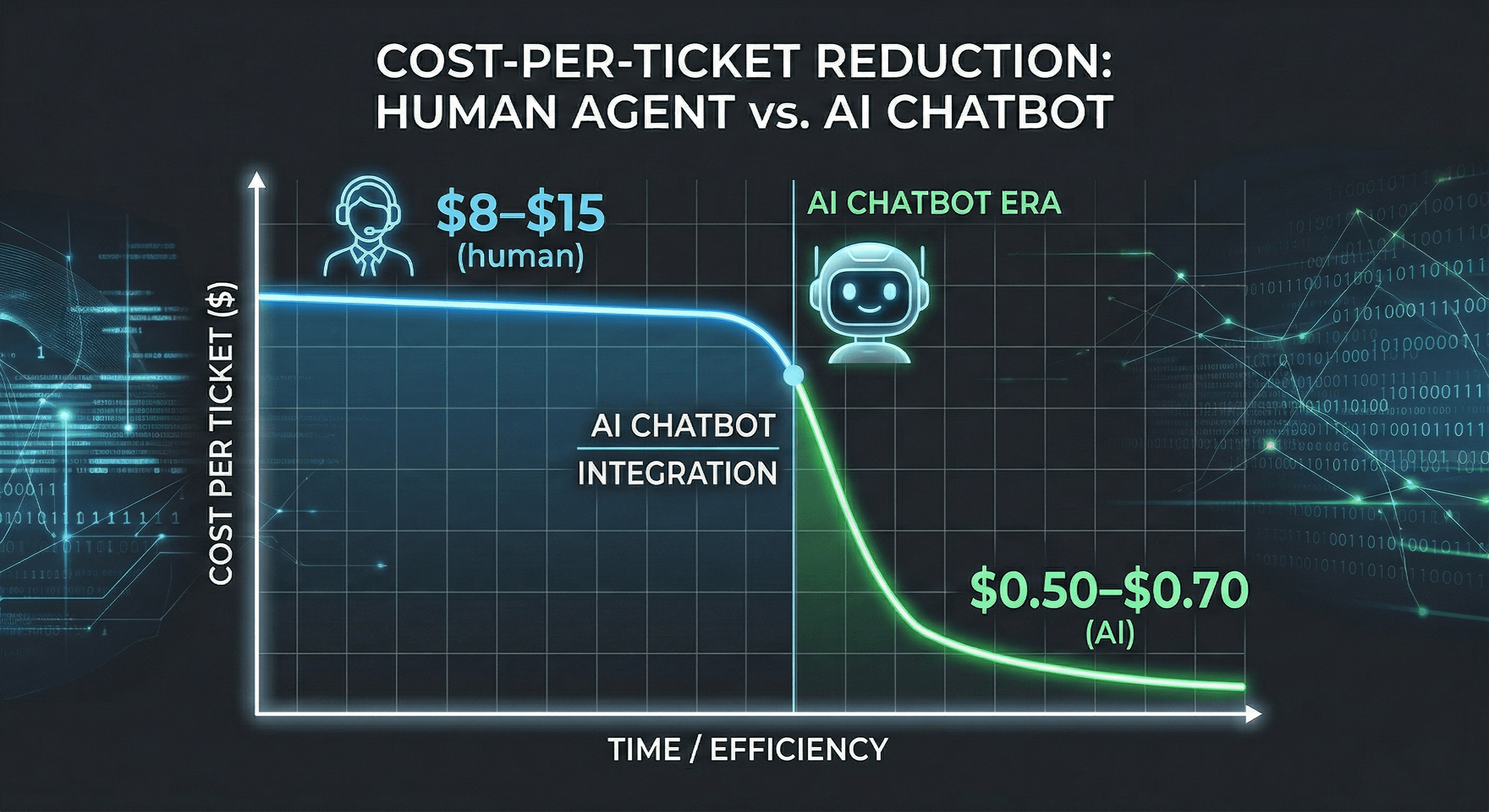
A single customer interaction handled by a live human agent costs between $8 and $15. That same interaction handled by a well-trained AI chatbot costs between $0.50 and $0.70.
That gap — roughly 10 to 20 times the cost difference — is not theoretical. It is what businesses across industries are already experiencing after implementing AI in their support operations. Companies that implement AI in customer support reduce their average cost per interaction by up to 68%, according to 2025 industry benchmarks.
For a SaaS startup handling 500 support tickets per month, that difference adds up to thousands of dollars every single month. For a growing company handling 5,000 tickets, it becomes a material line item that directly affects your runway and your ability to invest in growth.
Here is the concern most founders have: cutting costs in support usually means cutting quality. Slower responses. Less helpful answers. Frustrated customers. Higher churn.
That tradeoff is real — but only when support is cut the wrong way. When AI is implemented thoughtfully, the data shows the opposite outcome. Customer satisfaction improves alongside cost reduction, because AI delivers faster responses, consistent answers, and 24/7 availability that a human team simply cannot match at scale.
This guide breaks down exactly how to reduce your customer support costs with AI, what to automate first, how to protect quality throughout, and how to get started without a developer or a large budget.
Why Support Costs Keep Climbing — And Why Hiring More People Isn't the Answer
Before looking at the solution, it helps to understand why support costs grow so predictably and so fast.
The Traditional Support Cost Problem
Customer support in SaaS is expensive for a specific reason: it scales linearly with your user base. Every new customer you acquire has the potential to generate support tickets. As your user base doubles, your support volume roughly doubles. And the traditional response to more volume is hiring more people.
But hiring more people means salaries, benefits, onboarding time, training costs, equipment, and management overhead. A single full-time support agent costs between $35,000 and $60,000 per year fully loaded. And they can only handle one conversation at a time, during business hours, in the languages they speak.
This model breaks down fast. Your support costs grow in step with your revenue — which means your margins never improve as you scale. That is the fundamental problem.
What Drives the Biggest Costs
Three specific factors drive the majority of support costs for growing SaaS companies:
- Repetitive, low-complexity tickets — Research consistently shows that 60–80% of support tickets are variations of the same questions: password resets, billing inquiries, onboarding steps, feature questions. These tickets require no genuine expertise, yet they consume the majority of your team's time. You are paying skilled people to do work that does not require their skills.
- After-hours and weekend coverage — Modern customers expect support to be available when they need it, not when your team is scheduled. Providing 24/7 human coverage requires shift staffing, which significantly increases cost. Most early-stage startups simply leave customers without support outside business hours, which silently damages satisfaction and increases churn.
- Slow response times at scale — As ticket volume grows, response times increase. Longer wait times frustrate customers, increase churn, and generate follow-up tickets from the same customers who didn't hear back — compounding the problem.
The common thread in all three: they are solvable with automation. Not by cutting corners — by handling the right work with the right tool.
What AI Actually Reduces — And What It Doesn't Touch
The concern about quality loss is legitimate, so let us be precise about what AI reduces versus what it protects.
What AI Reduces
- Cost per ticket — AI handles high-volume, routine tickets at a fraction of the cost of human agents. The more tickets it resolves autonomously, the lower your average cost per interaction becomes.
- Response time — AI responds in milliseconds regardless of volume, time of day, or day of week. First response time — one of the highest-impact metrics for customer satisfaction — drops from hours to seconds.
- After-hours staffing requirements — AI operates around the clock without additional cost. You eliminate the need for shift staffing or on-call rotations for routine inquiries.
- Agent burnout and turnover — Repetitive work is the primary driver of support agent burnout. When AI handles the routine tickets, your human agents work on more complex, interesting problems. Companies that implement AI effectively often see reduced turnover among frontline support staff.
What AI Does Not Touch
- Complex problem resolution — Novel issues, edge cases, and situations that require genuine judgment remain with your human team. AI recognizes when it doesn't have a reliable answer and escalates appropriately.
- High-value customer relationships — Enterprise accounts, key customers, and relationship-sensitive interactions need a person. AI does not attempt to replace these.
- Emotionally sensitive situations — Frustrated customers, escalations, and situations that require empathy are handled by humans. AI routes these immediately.
The model that works is not AI replacing humans. It is AI handling the repeatable work so humans can focus entirely on the work that actually requires them.
5 Specific Ways AI Reduces Customer Support Costs
Here is where the cost reduction actually comes from, broken down by mechanism.
1. Automated Resolution of Routine Tickets
The single largest cost driver in most support operations is volume — specifically, the volume of tickets that have clear, documented answers. Password resets. Pricing questions. Feature explanations. Onboarding steps. These tickets represent the majority of what your team handles every day.
An AI chatbot trained on your product documentation, FAQs, and policies resolves these tickets instantly and automatically. No agent time. No queue. No delay.
AI chatbots can handle up to 80% of routine customer inquiries autonomously, according to current benchmarks. For a team that previously handled 500 tickets per month manually, that means 400 tickets resolved without human involvement. The cost reduction on those 400 tickets alone is significant.
2. 24/7 Coverage Without 24/7 Staffing Costs
Providing round-the-clock support with human agents requires multiple shifts or an on-call rotation. For most startups, this is either unaffordable or unsustainable — which means customers get no support outside business hours.
AI eliminates this tradeoff entirely. A well-trained AI chatbot handles after-hours inquiries at no additional cost. Customers get instant responses at 11 PM on a Sunday. Your team wakes up to a clean inbox rather than a backlog. And you pay nothing extra for the coverage.
3. Reduced Cost Per Interaction Through Scale
Human support costs scale linearly — more tickets means more agents. AI support costs do not scale the same way. Once your chatbot is trained and deployed, it handles 100 tickets with the same operational cost as 10 tickets, or 1,000 tickets, or 10,000.
This is the compounding economic advantage of AI for growing companies. As your user base scales, your support volume grows — but your support costs do not grow at the same rate. Your cost per interaction drops as volume increases, rather than staying flat.
4. Faster Onboarding That Reduces Churn-Related Costs
Churn has a support cost that is frequently underestimated. When a trial user churns because they could not figure out how to complete setup, you lose the revenue from that customer — but you also lose the acquisition cost you already spent to get them.
An AI chatbot trained on your onboarding steps functions as a 24/7 onboarding guide for every new user, regardless of when they sign up. Questions that previously went unanswered until the next business day get resolved in seconds. Users who would have churned due to friction complete onboarding instead.
5. Multilingual Support Without Multilingual Hiring
For SaaS companies serving global customers, language is a hidden cost driver. Supporting customers in multiple languages traditionally requires either hiring multilingual agents or paying for translation services — both expensive.
AI handles this automatically. A chatbot with multilingual capability like customsupportai.com detects the customer's language and responds fluently, across 100+ languages, at no additional cost per language. You serve global customers without global staffing.
How to Implement AI Cost Reduction Without Losing Quality
Cost reduction through AI fails when quality is sacrificed. Here is the implementation approach that protects both.
Start With Your Highest-Volume, Lowest-Complexity Tickets
Do not try to automate everything at once. Audit your last 100 support tickets and identify which questions appear most frequently and have the clearest documented answers. These are your automation starting point.
For most SaaS companies, the top five categories are pricing questions, feature how-tos, account management basics, onboarding steps, and integration questions. Automate these first. Get them right. Then expand.
Build a Knowledge Base That Actually Answers Questions
The quality of your AI chatbot is determined entirely by the quality of your training content. Vague documentation produces vague answers. Clear, specific, complete documentation produces accurate, helpful responses.
Before training your AI, review your existing content. Rewrite anything that is unclear. Add information that is missing. Write answers the way your best support person would write them — specific, actionable, and complete.
customsupportai.com lets you train your chatbot from four sources: your website URLs, PDF documents, uploaded files, and custom text you type directly. Point it at your existing help content and it learns automatically. Add custom text for anything not published elsewhere. The more complete your training content, the higher your autonomous resolution rate — and the lower your cost per ticket.
Configure Human Handoff Properly
The moment your AI cannot reliably help a customer, it should hand off to a human — seamlessly, with full context. This is what prevents quality from degrading on complex issues.
Configure clear escalation triggers: explicit requests for a human, repeated low-confidence responses, or topics that fall outside your defined automation scope. When handoff happens, your team receives the full conversation history so nothing has to be repeated.
This division of labor — AI handles the routine, humans handle the complex — is what allows cost reduction and quality improvement to happen simultaneously.
Monitor and Maintain Actively
Set a recurring calendar block to review your chatbot's performance — weekly for the first month, bi-weekly after that. Check which questions went unanswered. Add missing content. Update anything that changed (new features, updated pricing, new policies). A chatbot that is actively maintained improves over time. One that is left alone degrades as your product evolves.
What This Looks Like for Real SaaS Teams
Early-Stage Startup: Recovering Runway
A two-person SaaS startup was spending a combined 15 hours per week on support. At a conservative $50/hour founder time value, that was $750 per week — $3,000 per month — spent answering questions that were already documented in their help center. After deploying an AI chatbot on customsupportai.com's free plan and training it on their existing documentation, support time dropped to under four hours per week. The recovered time went directly into product and sales. The chatbot cost them nothing.
Growing SaaS: Scaling Without Headcount
A SaaS company post-Series A was projecting support volume to triple within six months. The linear model would have required three new full-time support agents at roughly $45,000 each — $135,000 in new annual headcount before they had the revenue to support it. After deploying AI to handle first-line support, they scaled through the growth period with one additional part-time agent. The cost saving was material to their burn rate.
B2B SaaS: Eliminating After-Hours Revenue Loss
A B2B SaaS company noticed that 35% of their website traffic came from time zones where their support team was offline. Prospects in those regions were asking pre-sales questions and getting no response — then closing the tab. After deploying an AI chatbot that handled pre-sales questions 24/7, pipeline from non-US regions increased measurably within the first quarter. The chatbot paid for itself in closed deals, not just in support cost reduction.
The ROI Calculation: What to Expect
Here is a straightforward framework for estimating your AI support ROI.
- Step 1: Calculate your current cost per ticket — Take your total monthly support spend (agent salaries, tools, overhead) and divide by your monthly ticket volume. For most early-stage SaaS companies, this number is between $8 and $20 per ticket depending on complexity and team seniority.
- Step 2: Estimate your automation rate — A well-trained AI chatbot typically resolves 55–75% of tickets autonomously in the first month, improving over time. Use 60% as a conservative starting estimate.
- Step 3: Calculate the cost of automated tickets — Multiply your monthly ticket volume by your automation rate. Those tickets now cost roughly $0.50–$0.70 each instead of $8–$20 each.
- Step 4: Calculate your monthly saving — (Automated ticket volume × old cost per ticket) minus (Automated ticket volume × AI cost per ticket) = monthly saving.
Example: 500 tickets/month × 60% automation = 300 automated tickets. 300 × $10 (old cost) = $3,000. 300 × $0.60 (AI cost) = $180. Monthly saving: $2,820. Annual saving: $33,840.
customsupportai.com has an ROI calculator on the pricing page where you can enter your actual numbers and see your specific projection.
Common Mistakes That Eliminate the Cost Savings
- Training the AI on thin content and going live immediately — An AI with incomplete training gives wrong or unhelpful answers. Customers escalate everything to humans. Your automation rate is near zero and your quality suffers. Fix: build the knowledge base first, then launch.
- Automating too aggressively and hiding the human option — If customers cannot easily reach a human when they need one, satisfaction drops and churn increases — erasing the financial benefit of cost reduction. Always keep human escalation visible and accessible.
- Treating deployment as a one-time project — Your product changes. Your pricing changes. New features ship. If your training content is not updated to reflect these changes, your chatbot gives outdated answers. Assign ownership and set a maintenance cadence.
- Measuring only cost, not quality — Track customer satisfaction alongside cost metrics. If your CSAT drops as costs fall, your implementation needs adjustment. The goal is both, simultaneously — not a tradeoff between them.
Key Takeaways
- A human agent costs $8–$15 per interaction. An AI chatbot costs $0.50–$0.70. That gap is where your cost reduction comes from.
- AI reduces costs through five mechanisms: automated ticket resolution, 24/7 coverage without staffing costs, non-linear scaling, churn reduction through better onboarding, and multilingual support without multilingual hiring.
- Quality does not have to suffer. When AI handles routine tickets and humans handle complex ones, both cost and satisfaction improve simultaneously.
- Your knowledge base determines your results. Invest in training content before you invest in the tool.
- The ROI compounds over time. AI systems improve with every interaction, automation rates increase, and your cost per ticket drops further as volume grows.
- Starting free is the lowest-risk way to validate the impact. You do not need a paid plan to see whether AI changes your support economics.
Start Reducing Your Support Costs Today — Free
The math is straightforward. The implementation is simpler than most founders expect. And the cost of waiting is real — every month without AI is another month of paying $8–$15 per ticket for questions your documentation already answers.
customsupportai.com gives you everything you need to start: create your chatbot, train it on your website content, PDFs, documents, or custom text, embed it on your site with one line of code from the Customization tab, and watch your cost per ticket drop.
Start on the free plan — no credit card required. 1 chatbot, 200 messages per month, 50 training pages. Enough to validate the impact before spending anything.
When you are ready to scale, Pro starts at $39/month and handles up to 5,000 messages and 1,000 training pages. At the savings most SaaS teams see in month one, the plan pays for itself many times over. Visit customsupportai.com to create your free account.